

Custom property reports are configurable, scheduled owner and portfolio statements pulled directly from your property-management and accounting data, rather than hand-built spreadsheets. The recommended path is to automate and centralise this reporting through an integrated platform. Prop Report is one direct option built specifically for that job.
TL;DR:
- Automating reports reduces manual effort from 20-40 hours per month to just a few, especially in portfolios with 60 or more owners.
- Owners prefer concise, one-page summaries with key figures and a clear 30-day outlook over dense data dumps, improving satisfaction and retention.
- Setting owner preferences for report format, delivery channel, and exception thresholds before automation prevents costly retrofitting later.
- Using a small set of standardized report templates for different property types and portfolio sizes ensures operational efficiency and consistency.
- Ensuring source data accuracy and validation is critical, as errors can propagate wildly through automation, undermining trust and requiring early testing.
Table of Contents
- What should a custom property report actually include?
- How do you set up automated custom property reports?
- What's the real ROI of automating custom property reports?
- What should you collect from owners before automating?
- Customisation options for different property types and portfolios
- Which metrics and KPIs actually belong in a custom report?
- How can you use reports to make better property management decisions?
- What goes wrong when building custom property reports, and how do you fix it?
- Publisher perspective: how Prop Report approaches custom reporting
- How Prop Report can help with custom property reports
- Sources
What should a custom property report actually include?
A report that owners trust and property managers can defend under questioning needs more than a rent figure and a total. The core financial and operational fields are non-negotiable: rent roll, income and expense summary, net operating income, reserve balances, and upcoming lease expiries. Miss any of these and an owner's next question exposes the gap.
Numbers alone don't answer the question every owner actually asks, which is "why". A variance of £1,200 against last month means nothing without context: a boiler replacement, a vacancy gap, a one-off insurance renewal. That's where narrative commentary earns its place. It explains what happened, flags maintenance context the owner should know about, and previews actions coming up in the next cycle.
The strongest reporting setups produce several outputs from one dataset rather than rebuilding the same numbers by hand for different audiences:
- A one-page executive summary for owners who want the headline figures and nothing else
- A detailed line-item export for owners or accountants who want to audit every transaction
- A tax-ready annual pack that consolidates twelve months into filing-ready form
- Owner-portal views that update in real time rather than waiting for a monthly cycle
Owners tend to prefer the shorter format far more often than property managers expect. Neudash's guidance on owner reporting automation notes that owners respond better to a concise one-page summary with three key items and a clear next-30-day view than to a dense data dump, even when that dump is more thorough.
Monthly cycles also aren't enough on their own. A burst pipe, an emergency repair invoice, or a lease default shouldn't wait until the end of the month to reach an owner's inbox. Event-driven alerts, triggered the moment a threshold is crossed or a work order exceeds a set cost, sit alongside the standard monthly statement rather than replacing it.
How do you set up automated custom property reports?
Building this properly is less about picking software and more about sequencing the work correctly. Skip a step and you end up automating errors faster than you used to make them by hand.
- Map your source systems first. Identify exactly where rent roll data, ledger entries, and bank feeds live, and which fields each system actually populates reliably.
- Build one schema, not one template per owner. Veyra Group's operational guidance is blunt about this: standardise on two or three variants, detailed, summary, and executive, rather than accepting bespoke layouts for every owner relationship. A unique template per owner sounds like good service; in practice it becomes an automation liability that breaks every time you touch it.
- Connect via API-based integration and normalise account mapping. This is where most of the real friction lives. Systems like Yardi, AppFolio, and QuickBooks each structure chart-of-accounts data differently, and reconciling duplicate entries or accrual-versus-cash timing mismatches is the unglamorous work that determines whether the automation actually holds up.
- Design narrative templates and exception rules with a human checkpoint. Automated commentary generation works well for routine variance explanations, but flagged items, anything above a cost threshold or outside a normal pattern, need a defined path to a person before the report goes out.
- Pilot with a handful of owners before rolling out portfolio-wide. Prove the numbers tie correctly on a small group first.
The full workflow, from data collection through formatting, narrative generation, and delivery, needs every stage automated to see the real benefit; automating only the formatting step still leaves someone manually chasing numbers every month, according to Veyra Group's four-stage automation pattern.
Pro Tip: Automate one report end-to-end before touching a second. Prove the rent roll ties to the income statement on that single report, then scale the same schema across the portfolio rather than building five reports half-finished at once.
What's the real ROI of automating custom property reports?
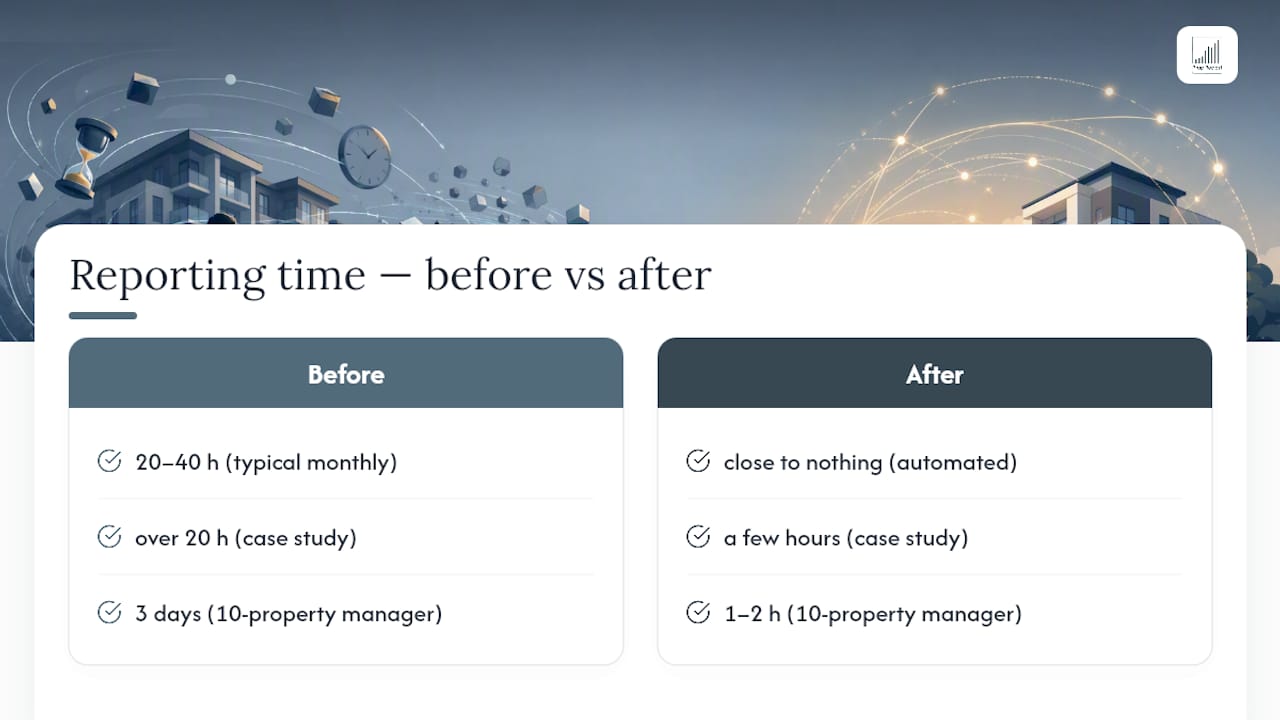
Time is the easiest number to put on this, and it's a large one. Automated owner reporting can cut monthly report preparation from 20 to 40 hours down to close to nothing for teams once it's fully implemented, particularly for firms managing 60 or more owners, according to Veyra Group's operational data.
A case study reports that a multi-system orchestration pipeline reduced coordinator production time from over 20 hours to a few hours per month by connecting multiple property management and accounting systems into one reporting flow. Source: US Tech Automations
That kind of reduction changes what a coordinator or property manager actually does with their week. Nineteen freed hours a month is close to half a working week, redirected from spreadsheet assembly into maintenance follow-ups, leasing, or owner calls that actually need a human.
The quality gains matter just as much as the hours. Manual reporting is inconsistent by nature, one manager formats a summary differently from another, and errors creep in whenever data gets copied between systems by hand. Automated pipelines deliver the same structure every cycle, which owners notice quickly and tend to reward with longer tenure.
Security sits underneath all of this. Reporting automation only works if owners trust the platform handling their financial data, which is why ISO 27001 certification, the international standard for information security management, is worth checking for before you connect live accounting feeds to any reporting tool. Prop Report holds this certification.
Picture a ten-property portfolio manager spending three full days a month compiling owner statements by hand. Automated, that drops to a review-and-approve task measured in an hour or two, freeing the rest for the work that actually grows the portfolio.
What should you collect from owners before automating?
Automation fails fastest when it launches on assumptions instead of actual owner preferences. A short intake exercise before rollout saves months of retrofitting later.
- Preferred report format (executive summary, detailed export, or both)
- Delivery channel (email, owner portal, or both)
- Reporting frequency and any exceptions to the monthly baseline
- Ownership or profit-split percentages where a property has multiple stakeholders
- Optional attachments the owner wants included, such as maintenance photos or forward-looking capex notes
Most portfolios run fine on a monthly baseline supplemented by event-driven alerts for anything urgent, rather than trying to build a different cadence per owner. Setting clear exception thresholds early, a repair above a set cost, a lease default, a vacancy beyond a set number of days, keeps the human review workflow focused on what actually needs a person's judgement instead of every report in the queue.
| Field to capture | Why it matters |
|---|---|
| Report format preference | Determines which of the 2–3 templates the owner receives |
| Delivery channel | Email and portal need different scheduling logic |
| Ownership split | Prevents payment and statement errors on co-owned properties |
| Exception threshold | Defines what escalates to human review versus what ships automatically |
Customisation options for different property types and portfolios
A single-family rental portfolio and a mixed-use commercial block need different report skeletons, even when both sit on the same underlying platform. Residential owners generally want rent roll status, arrears, and maintenance context front and centre. Commercial owners tend to weigh lease expiries, CAM (common area maintenance) reconciliation, and tenant-by-tenant performance more heavily, because a single vacant unit in a commercial building carries far more financial weight than one in a large residential block.
Portfolio size changes the calculus too. A landlord with four properties can tolerate a single, fairly generic template because the review burden per property is manageable. A manager overseeing 200 units across a dozen owners cannot; that's precisely the scenario where standardising on the 2 to 3 template variants mentioned earlier pays off, because bespoke reporting per owner at that scale becomes an operational bottleneck rather than a service feature.
Mixed portfolios, where a manager handles both residential and light commercial stock, benefit most from a platform that lets the underlying schema stay constant while surface-level formatting adapts to property type. That's the difference between genuine customisation and just relabelling the same spreadsheet. The goal isn't a unique report for every property; it's one flexible schema that flexes convincingly across property types without needing a rebuild each time a new asset class joins the portfolio.
Which metrics and KPIs actually belong in a custom report?
Every report should carry a small set of numbers that owners recognise instantly and property managers can defend without hesitation. Net operating income sits at the top of that list, alongside occupancy rate, average days vacant, and rent collection percentage.
Maintenance metrics deserve equal billing, particularly average work-order turnaround time and total maintenance spend against budget, because these are the figures that tell an owner whether a property is being looked after or quietly deteriorating. Lease-related KPIs, such as upcoming expiries within 90 days and renewal rate, give owners the forward view they actually want rather than just a rear-view mirror on last month.
For portfolio-level reporting rather than single-property statements, cap rate and cash-on-cash return become relevant, particularly for owners comparing performance across several assets. A manager reporting across a mixed portfolio should be able to show which properties are outperforming and which are dragging the average down, without the owner having to ask.
The mistake many reports make is including every KPI available simply because the data exists. A report crowded with twenty metrics buries the three that actually matter. The stronger approach, echoed in guidance on owner-facing formats, is to lead with the handful of numbers that drive a decision and push the rest into a detailed appendix or export for owners who want to dig further.
How can you use reports to make better property management decisions?
A report that only gets read once a month and then filed away is a wasted opportunity. The managers who get real value from custom reporting treat the numbers as a decision trigger, not a compliance document.
Watch trends across cycles rather than single snapshots. One month of rising maintenance spend might be a one-off repair; three consecutive months of rising spend on the same property is a signal that something structural needs attention, ageing plumbing, an HVAC system nearing end of life, or a tenant causing repeated damage.
Use variance narrative as a prompt for owner conversations, not just an explanation after the fact. If a report flags a vacancy running longer than average for a unit type, that's the moment to discuss a rent adjustment or a marketing push, not two months later when the owner asks why income is down.
Cross-reference maintenance KPIs against lease renewal rates. Properties with slow work-order turnaround times tend to show weaker renewal rates over time, and a report that surfaces both metrics side by side makes that connection visible before it costs you a tenant.
Finally, treat the exception alerts as an early-warning system rather than noise to clear. A rent-collection dip flagged the week it happens gives you time to intervene; the same dip discovered at month-end reporting gives you time only to explain it.
What goes wrong when building custom property reports, and how do you fix it?
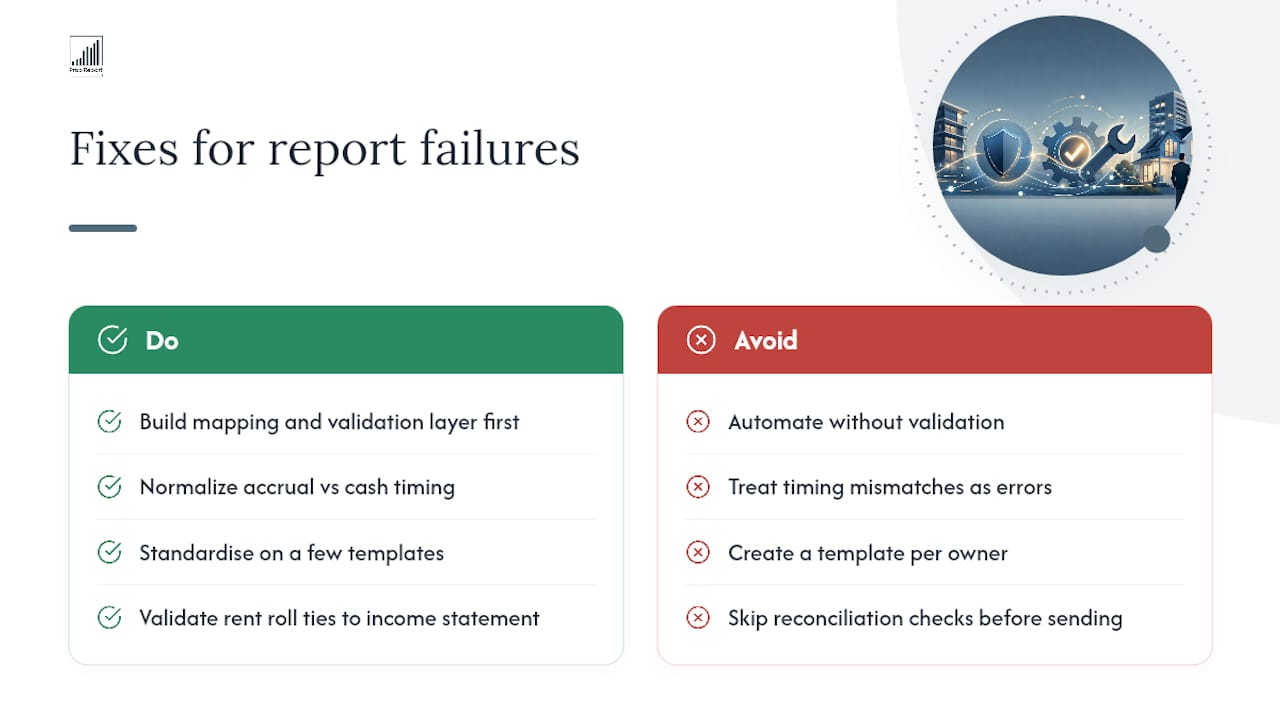
The most common failure point isn't the reporting tool itself. It's dirty source data feeding into it. Automated pipelines amplify whatever they're given, so a mismatched account code or a duplicate ledger entry doesn't stay a small error, it propagates into every report generated from that data. Guidance on AI-driven portfolio dashboards is direct about this: build the mapping and validation layer first, because automation without it just produces confident-looking wrong numbers faster.
A closely related problem is accrual-versus-cash timing mismatches between the accounting ledger and the property-management system. A payment recorded on different dates in each system creates a variance that looks like an error but is actually a timing artefact, and chasing it manually every month wastes hours that automation was supposed to save.
Template sprawl is the second recurring issue. Teams that agree to build a unique report layout for every owner who asks end up maintaining dozens of near-identical templates, each one breaking independently when a source field changes. Standardising on a small number of variants, as covered earlier, is the fix, not a compromise.
Reconciliation gaps between the rent roll and income statement cause the most owner complaints. A validation step that checks these two figures tie out and flags mismatches before narrative generation runs is essential, according to detailed automation guidance from US Tech Automations, because sending an owner a report with numbers that don't reconcile damages trust faster than almost anything else in this workflow.
Finally, distribution calculations and final investor narrative in fund-style reporting should stay human-reviewed regardless of how mature the automation gets. The CRE back-office automation playbook is clear that these remain regulatory and trust-sensitive tasks where a person needs to sign off before anything goes out.
Publisher perspective: how Prop Report approaches custom reporting
Prop Report is built around a single schema with two or three template variants, integrated directly with existing CRM and accounting systems, and secured under ISO 27001 certification. Most clients see the biggest shift in their first month, when the standard monthly statement stops eating a full day and becomes a short review-and-send task. By month three, the exception workflow usually matters more than the templates themselves, because that's what determines whether owners trust the numbers. Start with one report, on one portfolio segment, and measure the hours it saves before expanding further.
— James
How Prop Report can help with custom property reports
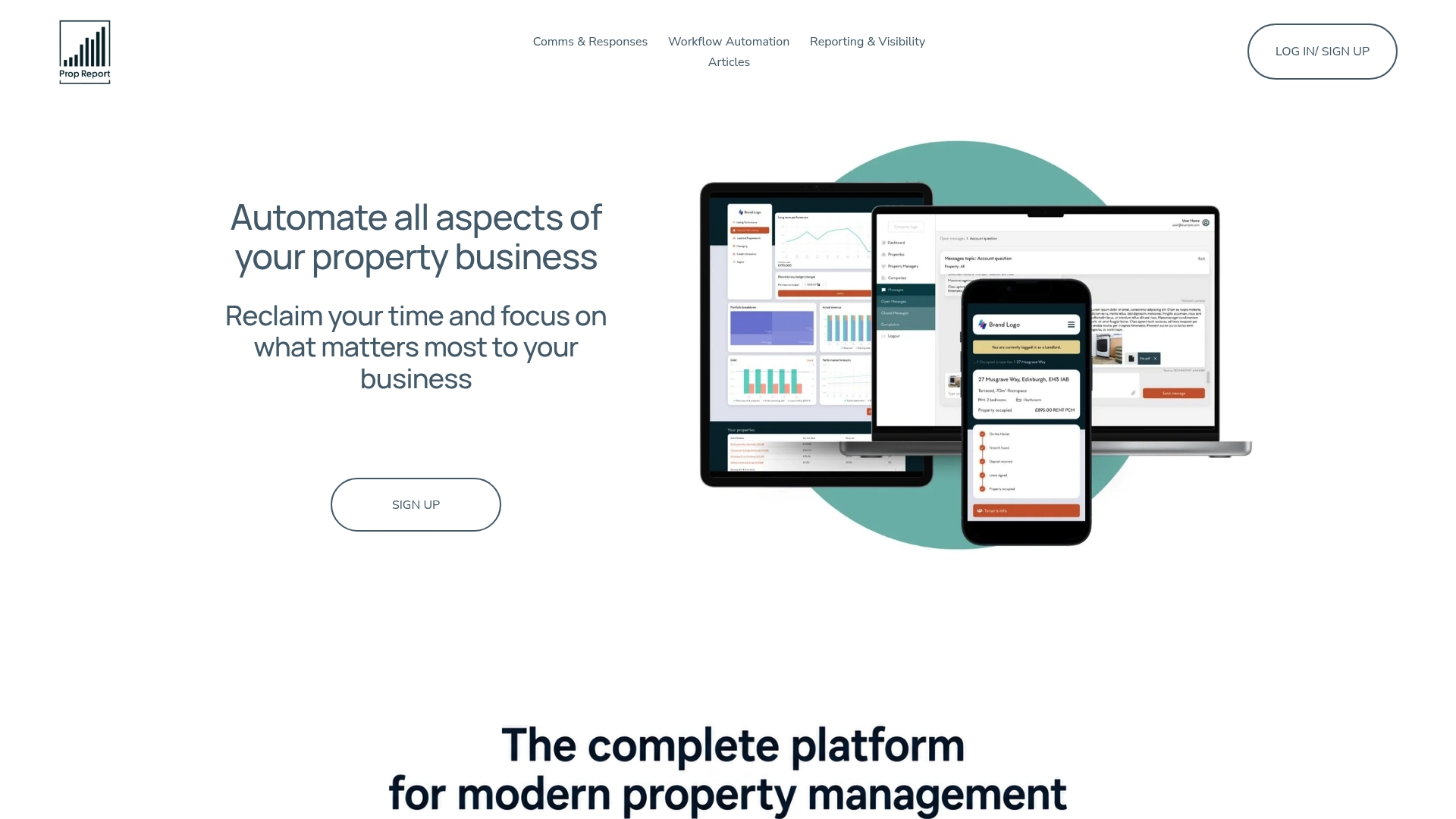
Some platforms can replace the spreadsheet-and-email routine many property managers still run every month with a single integrated platform. Where a traditional setup means exporting from your accounting system, reformatting in a spreadsheet, and emailing each owner separately, Prop Report connects those systems directly, applies your report schema automatically, and delivers through email or the owner portal on the schedule you set.
ISO 27001 certification helps ensure owner financial data stays secured to a recognised international standard throughout that process, not just at the point of collection. Combined with automated narrative generation and event-driven alerts for anything that can't wait for month-end, it covers the full workflow this guide has walked through rather than just one piece of it.
If you're managing reports for owners across a growing portfolio, the practical next step is to see how your current systems would map onto a reporting pilot before committing to a full rollout. Book a demo and bring one report to test end-to-end, then decide from real numbers rather than a sales pitch.
Sources
- Automated Owner Reporting for Property Managers: Save 30+ Hours/Month | Veyra Group
- Owner Reporting Automation for Property Management | Neudash
- Automate Owner Reporting: Yardi, QuickBooks, AppFolio 2026